
Attendance Calculator
Calculate attendance percentage, required counts, and maximum absences quickly and accurately — for one person or an entire group.
- Fast & Accurate
- Single & Batch
- PDF Download
- Works on Mobile
Attendance Calculator
Enter the combined totals across the entire group to get the overall batch attendance percentage.
| Name | Total | Attended | Absent | Attendance | Action |
|---|
Overall Summary
What is an Attendance Calculator?
An attendance calculator is a free online tool that helps you quickly find your attendance percentage, the number of times you need to attend to reach a target, the maximum you can miss, and any attendance shortage. Instead of manually applying formulas, you simply enter your total count and attended count — and the calculator instantly returns accurate results.
This attendance calculator is universal. It works for any scenario where attendance is tracked over a period — whether you are a student checking class attendance, a teacher monitoring a batch, an employee tracking working days, or anyone managing attendance in any form. All calculations run instantly in your browser, and no data is ever sent to a server.

Table of Contents
How to Calculate Attendance Percentage
Attendance percentage is the ratio of attended count to total count, expressed as a percentage. The formula is simple:
Attendance % = (Attended ÷ Total) × 100

For example, if you attended 42 out of 50 sessions:
- Attendance % = (42 ÷ 50) × 100 = 84%
- Absent count = 50 − 42 = 8
You can enter either Total + Attended or Total + Absent. The calculator automatically determines the missing value. If you prefer using the Attendance Tracker, entering any two values will auto-fill the third.
How to Use This Attendance Calculator
This tool provides seven different calculation modes, each designed for a specific question:
- Single Attendance Percentage — Calculate attendance for one person by entering total and attended (or absent) counts. You can also set a minimum required attendance to instantly check whether the requirement is met.
- Batch Attendance Percentage — Aggregate totals across an entire group to get the overall batch attendance percentage. Ideal for a quick summary.
- Attendance Tracker — Track attendance for multiple people or rows side by side. It auto-fills the third value when two are entered, shows each row’s percentage with a green or orange status dot, and provides an overall summary.
- Attend to Reach Target — Find out exactly how many consecutive attendances are needed to reach a specific target percentage.
- Maximum You Can Miss — If your attendance is above the requirement, find out how many upcoming events you can miss while still meeting the minimum.
- Required Attendance — Determine the exact number of consecutive attendances needed to reach a required percentage.
- Attendance Shortage — See how many percentage points you are short of the requirement and how many consecutive attendances will close the gap.
Attendance Formula and Examples
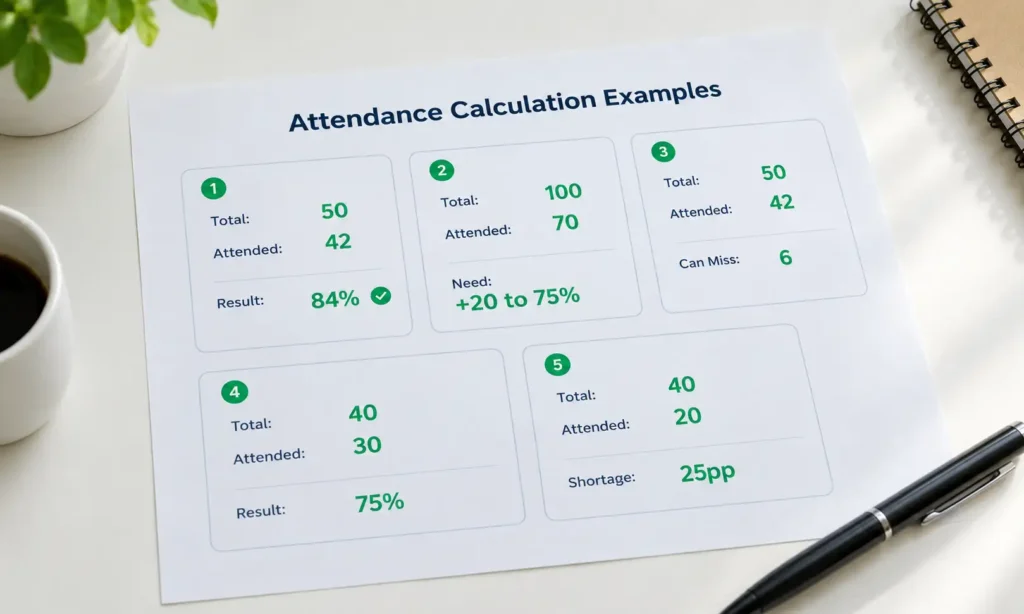
Example 1 — Basic Attendance Percentage
Total = 50, Attended = 42. Attendance = 84%. With a 75% minimum requirement, you meet the target.
Example 2 — Attend to Reach a Target
Total = 100, Attended = 70, Target = 75%. Formula: (70 + x) ÷ (100 + x) = 0.75. Solving gives x = 20. You need to attend 20 more consecutive times to reach 75%.
Example 3 — Maximum You Can Miss
Total = 50, Attended = 42, Required = 75%. Current attendance is 84%. Using floor((100 × 42 − 75 × 50) ÷ 75) = 6, you can miss up to 6 upcoming events and still meet 75%.
Example 4 — Already at Required Attendance
Total = 40, Attended = 30, Required = 75%. Current attendance = 75%. You meet the requirement exactly.
Example 5 — Attendance Shortage
Total = 40, Attended = 20, Required = 75%. Current = 50%, shortage = 25 percentage points. The calculator determines how many consecutive attendances are needed to reach 75%
Why Use an Online Attendance Calculator?
Manual calculation is error-prone, especially when you need to figure out targets, shortages, or maximum misses. This online attendance calculator:
- Instantly computes attendance percentage with no manual math
- Uses mathematically correct ceiling and floor logic — so the results never round in a way that breaks the attendance requirement
- Handles all edge cases: empty inputs, negative numbers, attended exceeding total, and invalid combinations
- Works on mobile, tablet, and desktop with a fully responsive layout
- Lets you download the result and the Attendance Tracker as a PDF for record-keeping
- Is completely free, with no sign-up and no data sent to any server
Frequently Asked Questions
How is attendance percentage calculated?
Attendance percentage is calculated by dividing the attended count by the total count, then multiplying by 100. For example, attending 42 out of 50 gives (42 ÷ 50) × 100 = 84%.
What is the formula for attendance percentage?
The formula is: Attendance % = (Attended ÷ Total) × 100. If you know the absent count instead of attended, attended = Total − Absent.
What is the difference between Single and Batch attendance?
Single Attendance calculates the percentage for one person using their own total and attended counts. Batch Attendance aggregates the totals across a group to give the overall attendance percentage. Use Batch mode for a quick summary and the Attendance Tracker for per-person details.
How many can I miss and still maintain 75% attendance?
It depends on your current total and attended count. Use the “Maximum You Can Miss” tab: enter your total, attended count, and required percentage (e.g., 75%). The calculator will show exactly how many upcoming events you can miss while staying at or above the requirement.
How many do I need to attend to reach 75%?
Use the “Attend to Reach Target” or “Required Attendance” tab. Enter your current total, attended count, and target percentage. The calculator uses ceiling logic to give you the exact minimum number of consecutive attendances required.
Can I use this calculator for education, work, and other scenarios?
Yes. The calculator is universal. It works for any scenario where attendance is tracked over a period — whether you are managing education, work, training, or any recurring commitment. You only need the total count and the attended count.
Does the attendance calculator work on mobile?
Yes. The calculator is fully responsive and works on all screen sizes, from 320px mobile phones to large desktop screens. All buttons and inputs are touch-friendly with a minimum height of 44 pixels.
Can I download the attendance report as PDF?
Yes. Every calculation result and the Attendance Tracker summary include a “Download PDF” button. Click it to save a clean, printable PDF report of the attendance data for sharing or record-keeping.
Is my data safe?
Yes. All calculations happen entirely in your browser. No data is sent to any server, and nothing is stored. Your inputs remain private.